LLM Knowledge: Using Claude CLI as the Brain of Your Personal Knowledge Base
A self-hosted tool that collects, extracts, and connects your reading — so you don’t have to do it manually.
Live demo: wiki.bruceding.me · Source: github.com/bruceding/llm_knowledge
Tags for Medium: AI, Knowledge Management, Claude, Self Hosted, Open Source, Developer Tools, LLM, Productivity
Suggested cover image: llm-knowledge-arch.png (the architecture diagram) or wiki-inbox.png (the inbox screenshot).
We’ve all been there. You read a great article in the browser, bookmark it, and never find it again. You subscribe to a dozen RSS feeds and newsletters, and the inbox turns into noise. You download an English research paper, skim the abstract, and forget about it. Every tool out there solves the save step — bookmarks, Pocket, Readwise, Notion — but almost none of them help you actually understand what you saved, let alone connect it to what you read last month.
I built LLM Knowledge to close that gap. It’s a small, self-hosted service that ingests content from anywhere (PDFs, web pages, RSS, blogs, newsletters), uses Claude to extract structure and summaries, lets you chat with each document and with your entire knowledge base, and organizes everything into a growing wiki of cross-referenced entries. You download one binary, run it, and all your data stays on your machine.
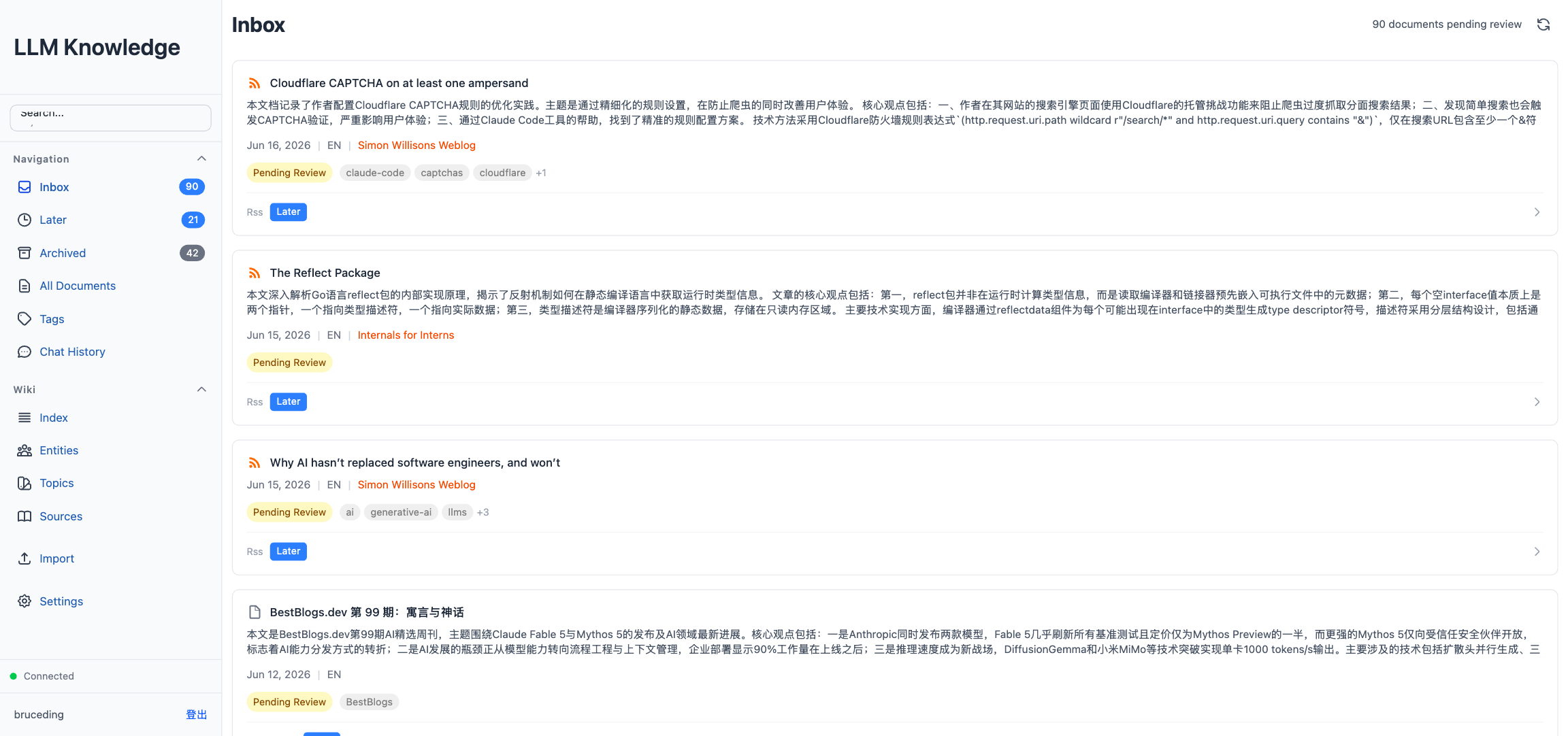 The Inbox view. Every document card comes with an LLM-generated summary, tags, a language badge, and status buttons.
In this post I’ll walk through what the tool does, the design trade-offs behind it, and a few of the more interesting implementation decisions — especially around how Claude CLI (not the SDK) becomes the brain of the whole system.
What it does, in one minute
LLM Knowledge has four main loops:
- Collect — drag-and-drop a PDF, clip a web page with the Chrome extension, subscribe to RSS or blogs, or sync newsletters over IMAP. Everything lands in a unified Inbox.
- Extract — Claude reads each document and produces a summary, tags, structured sections, and (for PDFs) a layout-preserving translation.
- Converse — chat with a single document, or chat with your entire wiki as if you had a research assistant who has read everything.
- Organize — when you publish a document, Claude also creates or updates entity pages, topic pages, and a source page in your personal wiki, with cross-references. The more you read, the denser the graph becomes.
The whole thing runs as a single Go binary with the frontend embedded, backed by SQLite, talking to Claude through a CLI subprocess. No vector database, no embedding model, no external SaaS.
The constraints I designed around
Before writing any code, I wrote down a few constraints. Every later trade-off is a consequence of these:
Self-hosted first. All data lives under ~/.llm-knowledge/. No third-party SaaS, no cloud sync, no telemetry. Sensitive documents never leave the machine.
One binary to ship. The React frontend is embedded into the Go binary at build time. Users grab a single executable and run it — no Node, no Nginx, no Docker required.
LLM as a subprocess, not an SDK. This is the most unusual choice and the one people push back on most. Instead of importing an Anthropic SDK, the backend spawns Claude CLI as a child process and talks to it over stream-json on stdin/stdout. The upside: model upgrades, model swaps, or even switching to a local model is just a matter of replacing the CLI binary. The downside: you have to manage subprocess lifecycles yourself — which turns out to be where most of the interesting engineering lives.
Multi-source, single pipeline. PDFs, web clips, RSS, blogs, and newsletters all go through the same path: keep the original, extract structured content, and publish to the wiki layer.
Multi-user, isolated. Data is partitioned by users/<id>/, so family members or teammates can share the same instance without their documents bleeding into each other.
Fail-closed security. Claude runs on your machine. That means a sandboxed filesystem is non-negotiable — more on this below.
The big picture
The system breaks into four layers: clients (browser, Chrome extension, mobile), the Go backend (Echo + GORM + SQLite), Claude CLI as a pool of subprocesses, and persistent storage (files under ~/.llm-knowledge/).
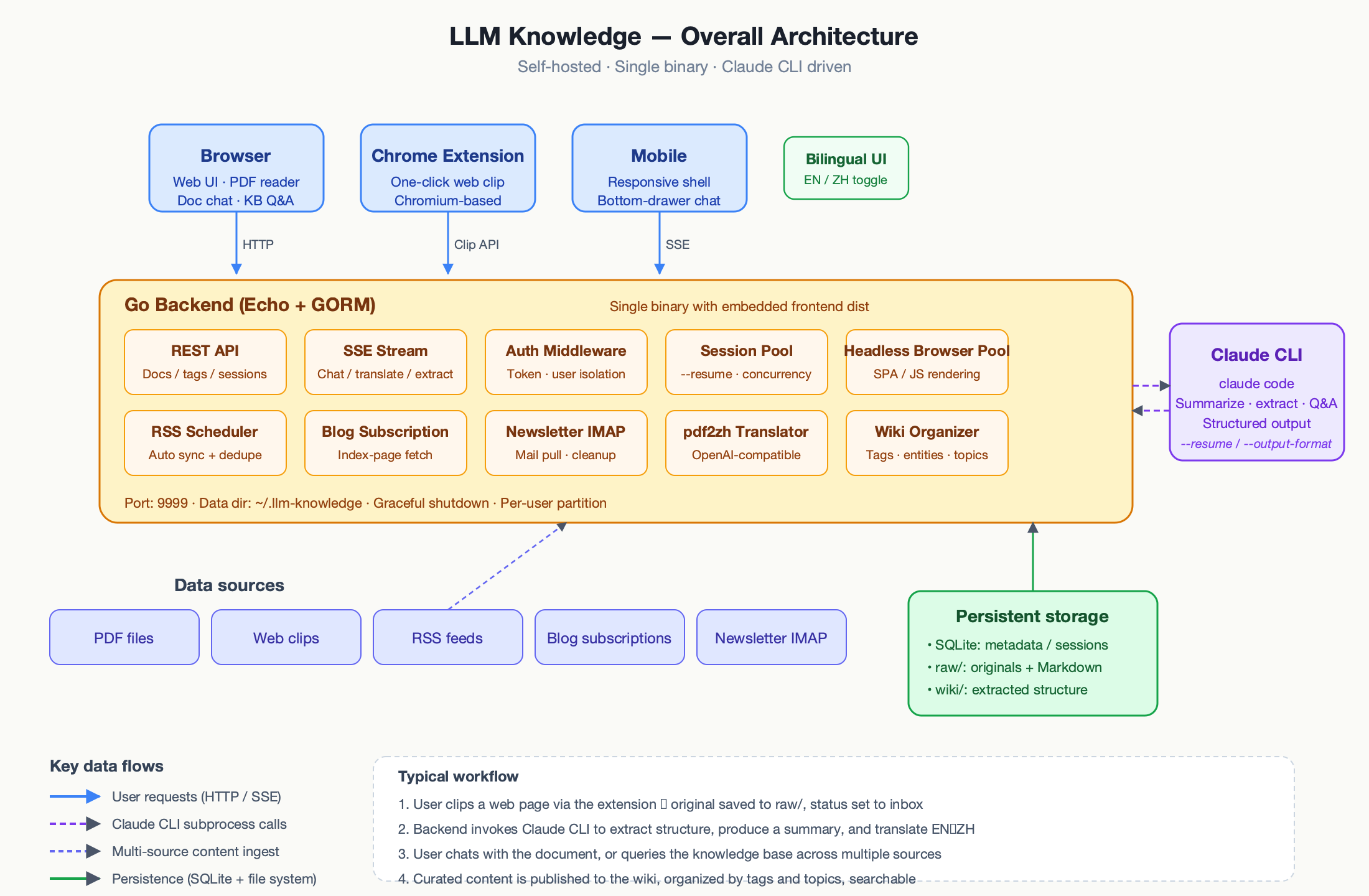 Architecture. The Go backend hosts REST + SSE endpoints, a session pool for Claude subprocesses, a headless-browser pool for SPA clipping, schedulers for RSS/Blog/Newsletter, and the pdf2zh translator.
The backend is Go with Echo for routing and GORM for SQLite. The frontend is React 19 + TypeScript + Vite + Tailwind v4, and the build output is embedded into the binary with Go’s embed package. Claude CLI runs as a subprocess, producing structured JSON line-by-line on stdout, which the backend parses and forwards to browsers over Server-Sent Events.
The features worth calling out
Doc Chat: one document, one subprocess
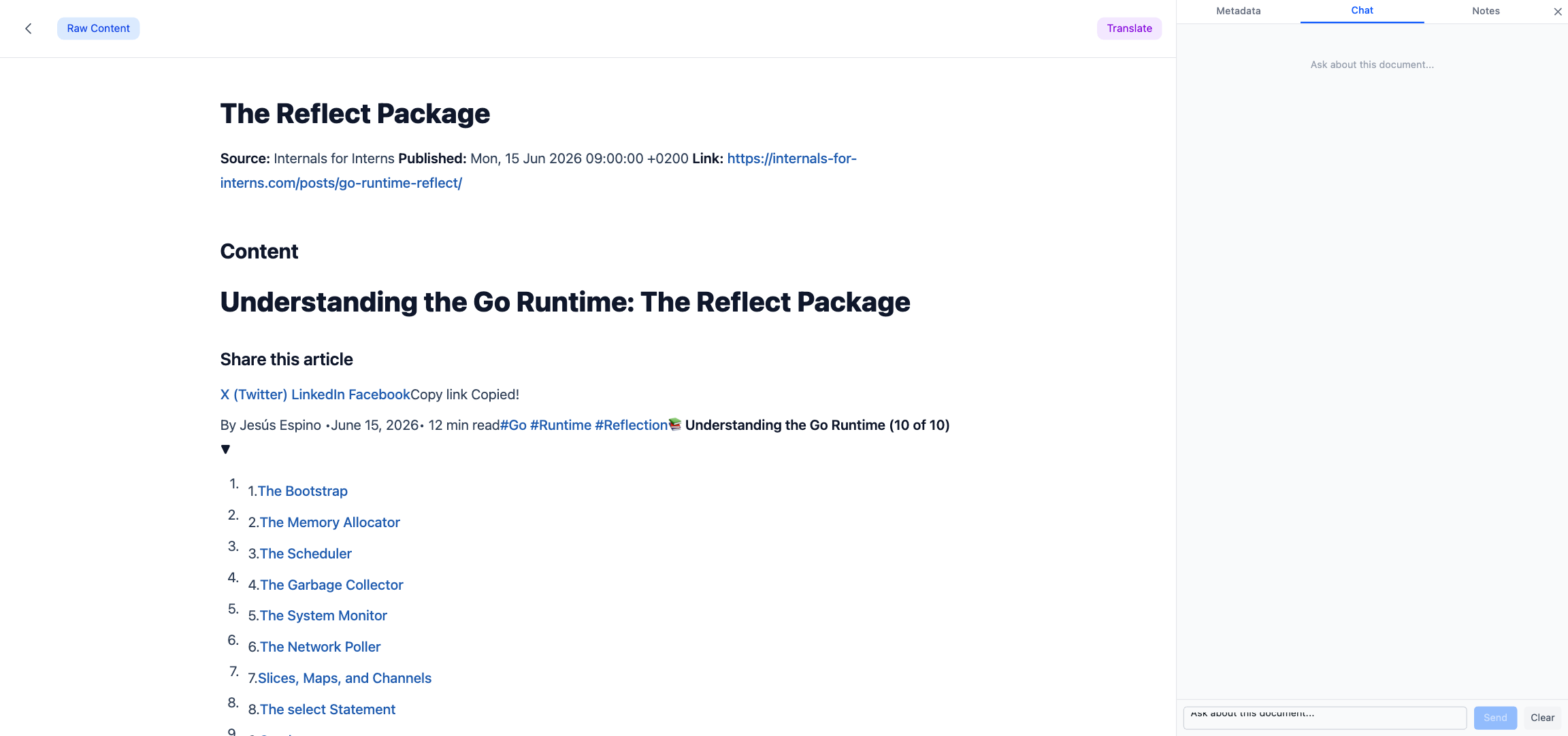
Open any document and switch to the Chat tab. You can ask anything about that specific document — “what’s the main argument?”, “summarize the methods section”, “what does the author say about X?”. It looks like a normal chat box, but underneath it’s the most carefully engineered piece of the system.
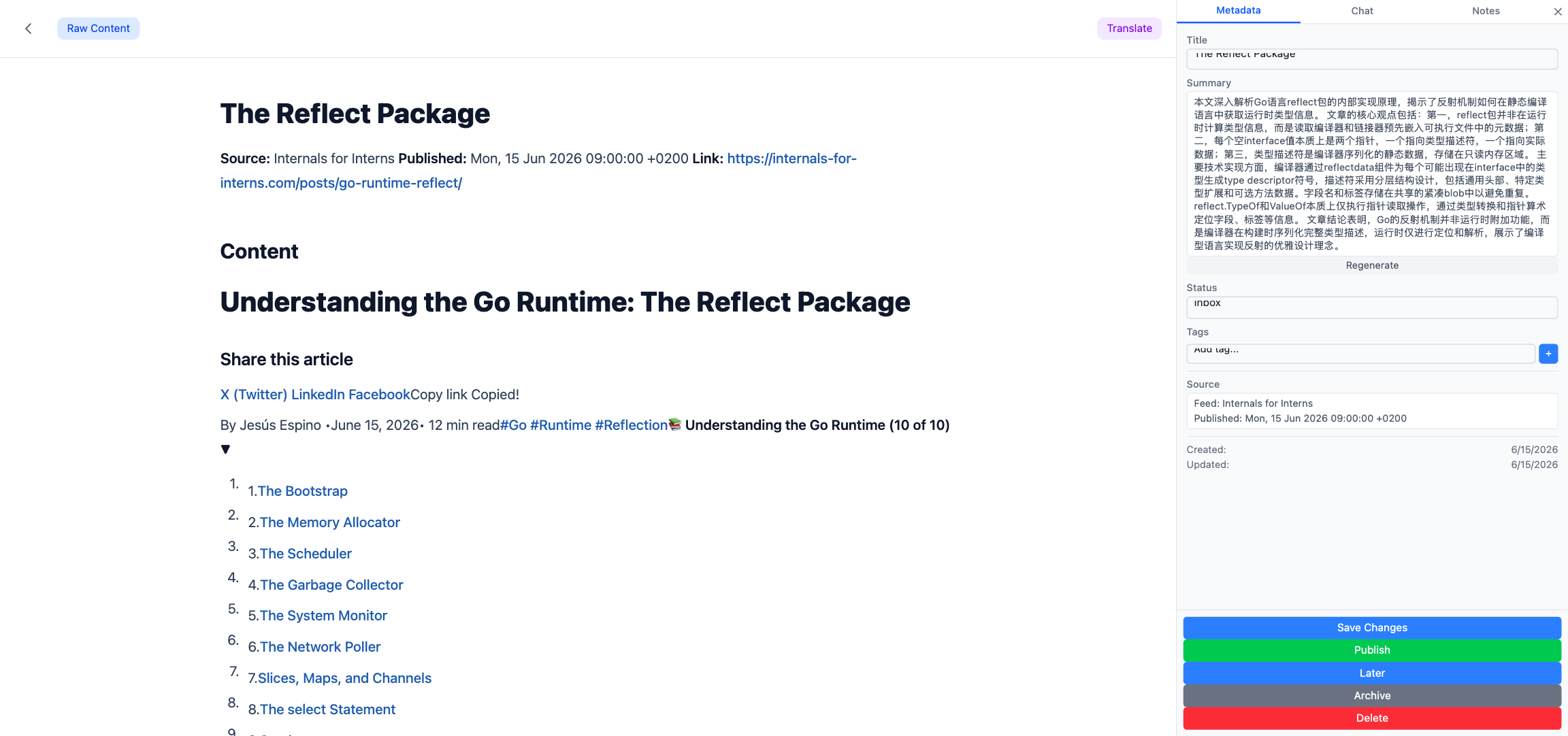 The document detail page, with the Chat tab highlighted.
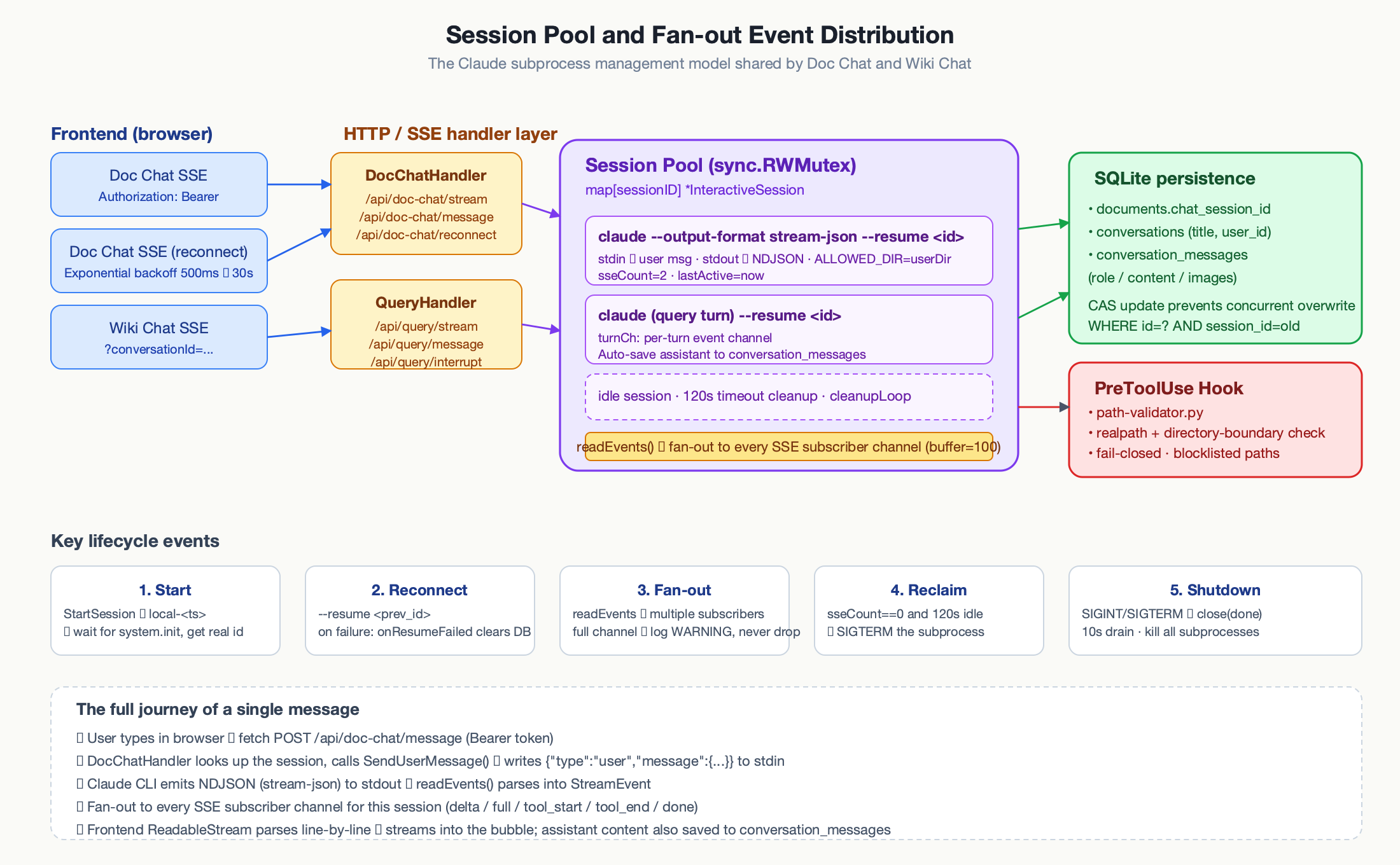
The naive approach would be: on every message, pack the document plus the conversation history, call the Claude API once, stream the response. That breaks down quickly — the document may be tens of thousands of tokens, re-sending it every turn is slow and expensive, and there’s no real notion of a session.
Instead, each open document pins a long-lived Claude CLI subprocess. The session ID is persisted to SQLite, so the next time the user returns, we --resume the same subprocess with its full conversation memory intact. The system prompt tells Claude the file path of the document and allows it the Read tool — it reads the document itself, lazily, as needed.
A message travels through six hops on its way back to the browser: the frontend POSTs with a bearer token, the handler looks up the subprocess for that document, writes a user event to stdin, Claude streams NDJSON to stdout, a readEvents goroutine parses each line and fans it out to every SSE subscriber, and the frontend parses the SSE frames with fetch + ReadableStream (not EventSource, because we need custom auth headers).
The event vocabulary is small but deliberate: delta for incremental text, full for full replacement after a reconnect, tool_start / tool_input / tool_end so the UI can show “reading paper.md…” — the user sees what Claude is doing, not a mysterious black box.
The sandbox that keeps this honest
Running Claude on the host machine is genuinely dangerous. A sufficiently creative prompt injection could try to read /etc/shadow or ~/.ssh/id_rsa. The defense is Claude’s own PreToolUse hook mechanism:
A small Python script (path-validator.py) is invoked before every Read, Write, Edit, Glob, Grep, or LS. It resolves symlinks with os.path.realpath(), checks that the resolved path starts with the user’s ALLOWED_DIR (passed in as an environment variable, with a trailing separator to prevent prefix collisions — /data/users/1 must not match /data/users/10), and rejects anything in a sensitive-path blocklist. If ALLOWED_DIR isn’t set, the hook refuses every access. Fail-closed.
On top of that, the CLI is launched with --disallowedTools Bash,Task,NotebookEdit,SlashCommand so even if the hook were bypassed, shell-like tools can’t run. WebFetch gets its own SSRF defense: scheme whitelist plus DNS-resolved IP blacklist with a 2-second DNS timeout.
Wiki Chat: an agent exploring a file cabinet
Knowledge-base chat looks similar to document chat on the surface, but the implementation is different in every dimension that matters.
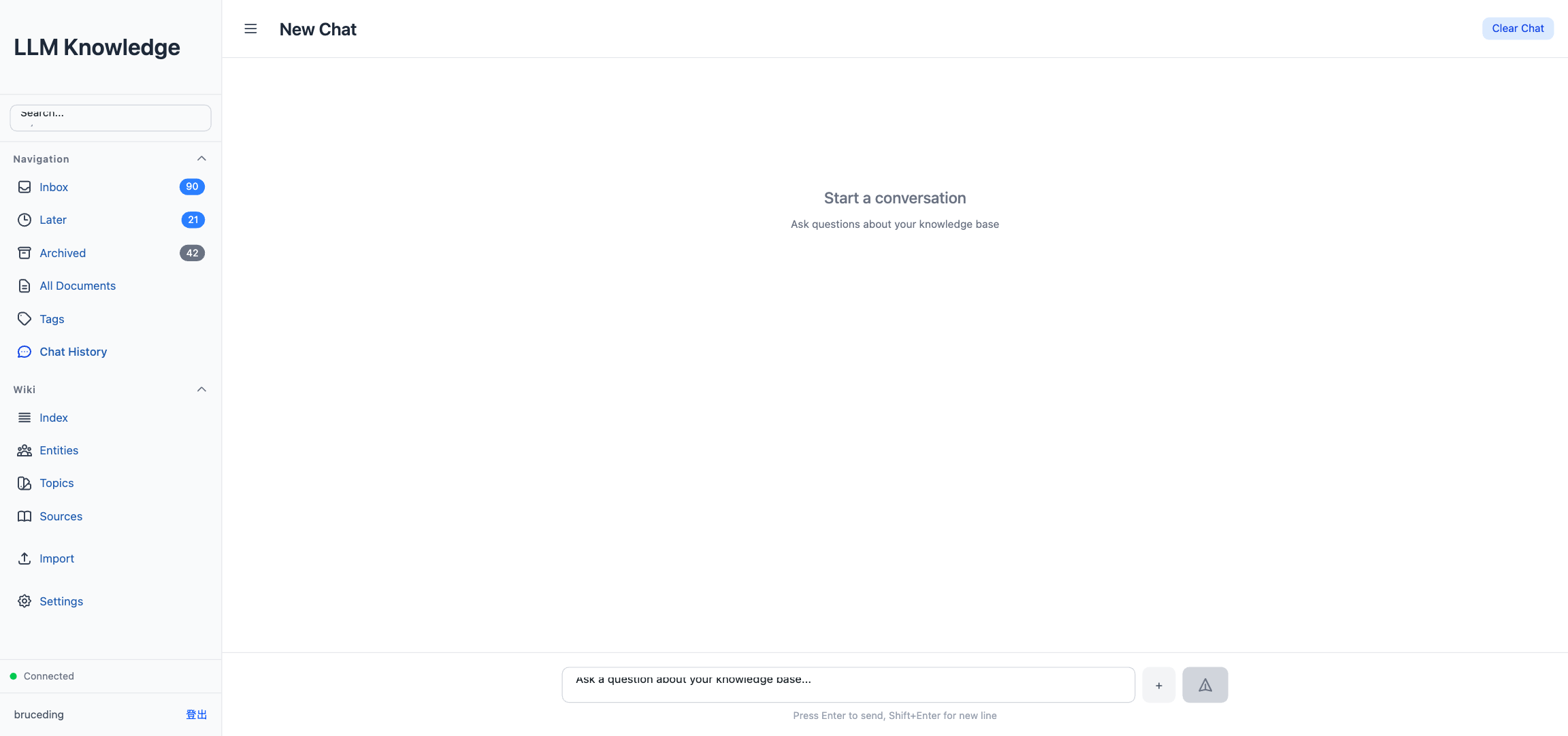
Where Doc Chat pins one subprocess per document and only allows Read, Wiki Chat pins one subprocess per conversation and allows Read, Glob, Grep, and LS. The system prompt tells Claude: “your knowledge base lives in wiki/, wiki/index.md is the index, use your tools to answer the user’s question.” It then explores the file system on its own — searching for files by name, grepping for keywords, reading whatever looks relevant — like an intern rummaging through a file cabinet.
There’s no vector database, no embedding model, no reranker. The trade-off: it’s trivially simple to operate, but it won’t scale to thousands of documents. For a personal knowledge base of a few hundred entries, it’s more than enough, and it sidesteps an entire category of infrastructure.
PDF translation with side-by-side reading
For English papers and reports, the tool offers a complete path from “original PDF” to “bilingual reading”:
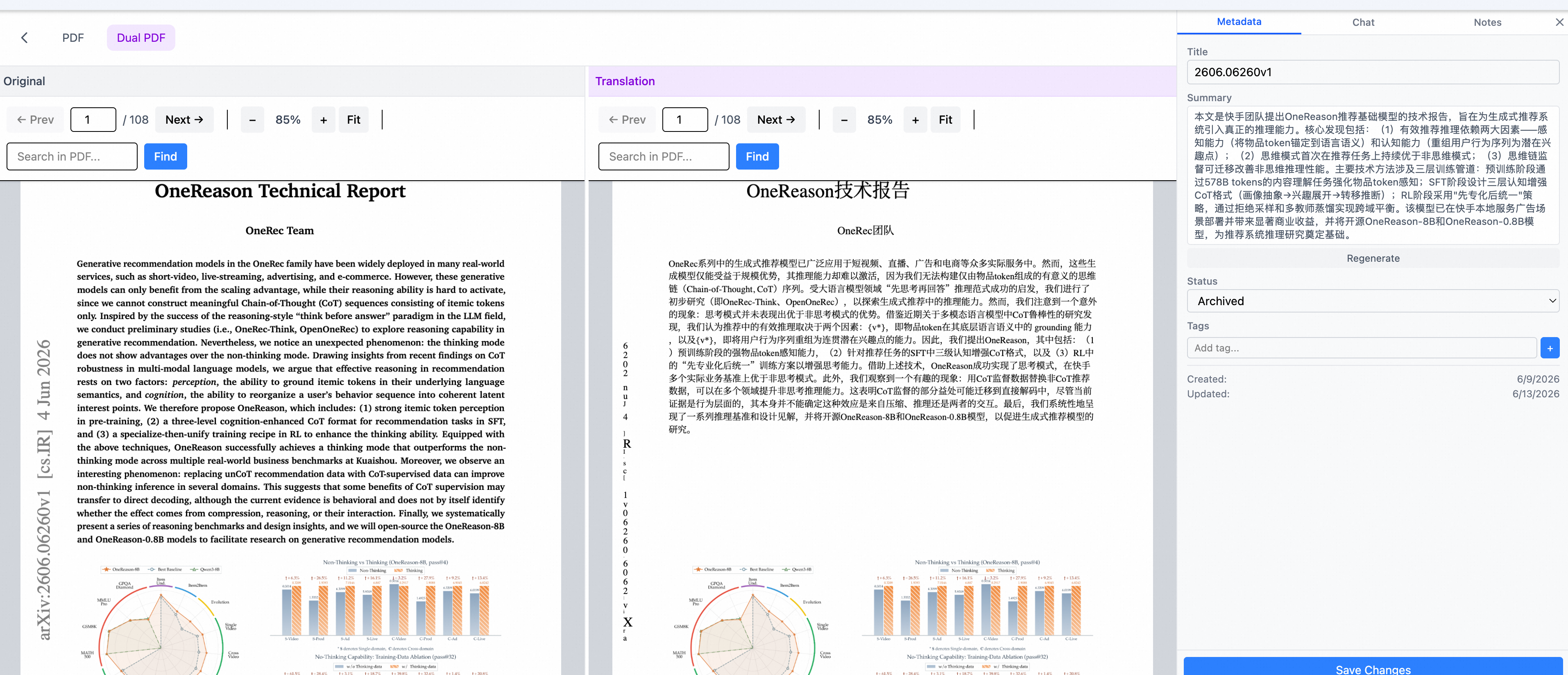
Translate is a single click on the document detail page. It invokes pdf2zh (running in an isolated Python 3.12 venv, talking to an OpenAI-compatible API — deepseek-v4-flash by default, configurable) to produce a layout-preserving translated PDF.
Dual PDF view appears once translation finishes. Both the original and translated PDFs load side by side, rendered with pdfjs-dist, with scroll and zoom events mirrored between them — scroll one side and the other follows.
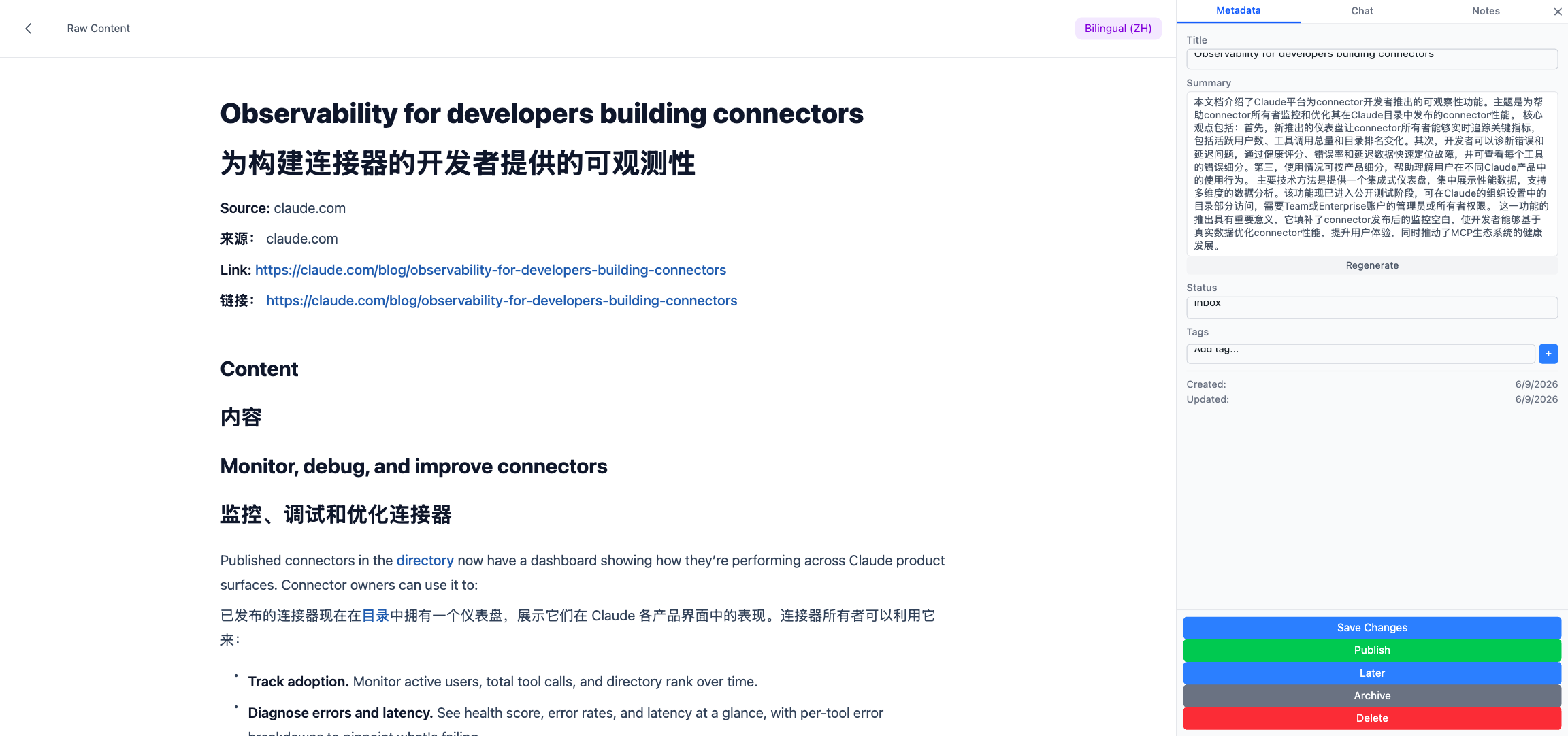
Bilingual view is a separate mode for HTML-sourced documents (web clips, newsletters). It renders a paragraph-level Chinese/English interleaving, better for quick skimming.
Each translation task has its own state field (pending / translating / done / failed) and the frontend polls translation-status for progress — no long-lived connections blocking anything else.
The Wiki pipeline: the most magical part
This is where the tool earns its keep. A user uploads a PDF or clips a web page. A few minutes later, a structured wiki entry appears — with entity pages, topic pages, and cross-references to other things they’ve read. The user did nothing but click “Publish.”
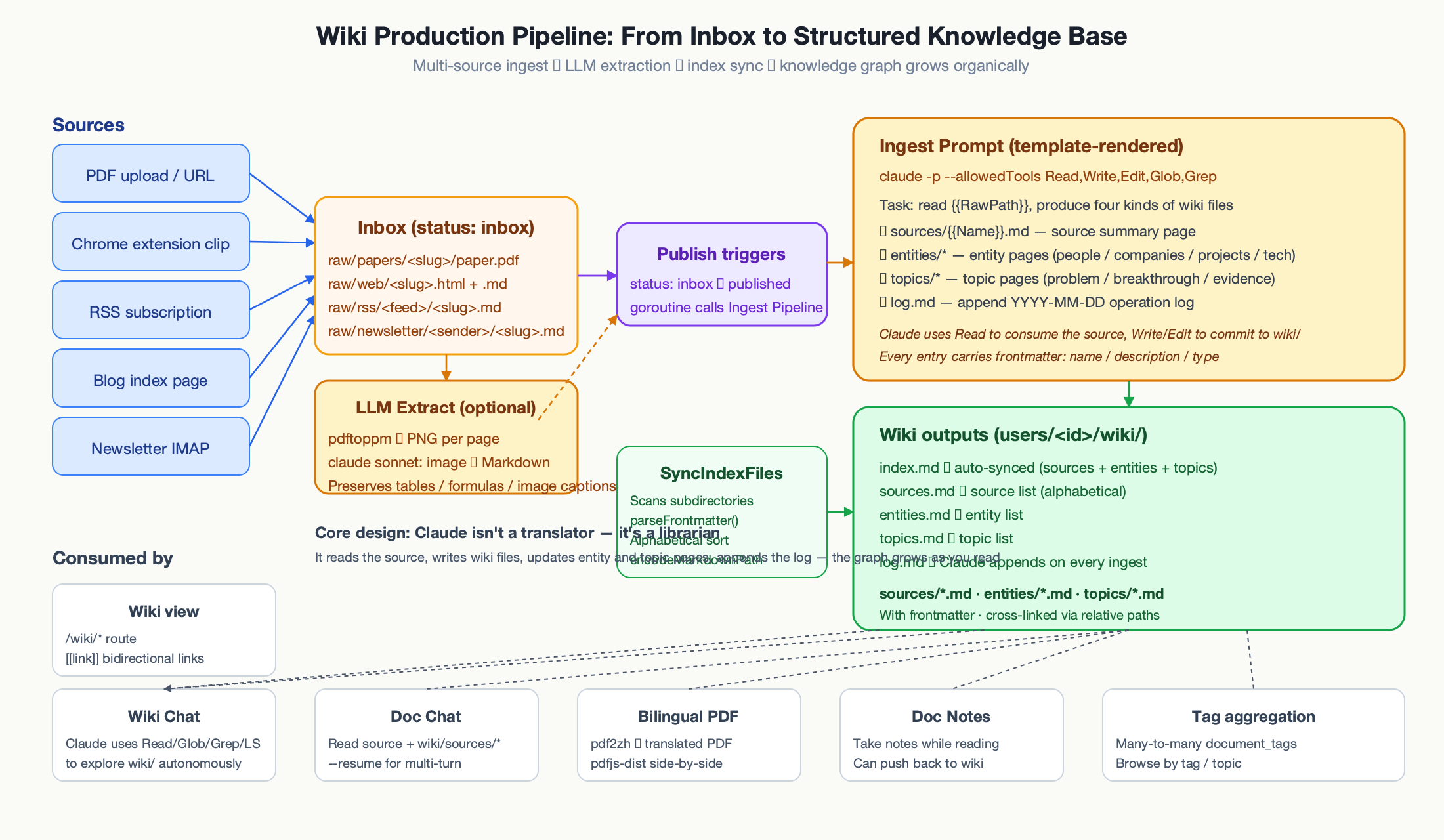
Many sources, one inbox
Content arrives from five different places and lands in raw/ with a status of inbox:
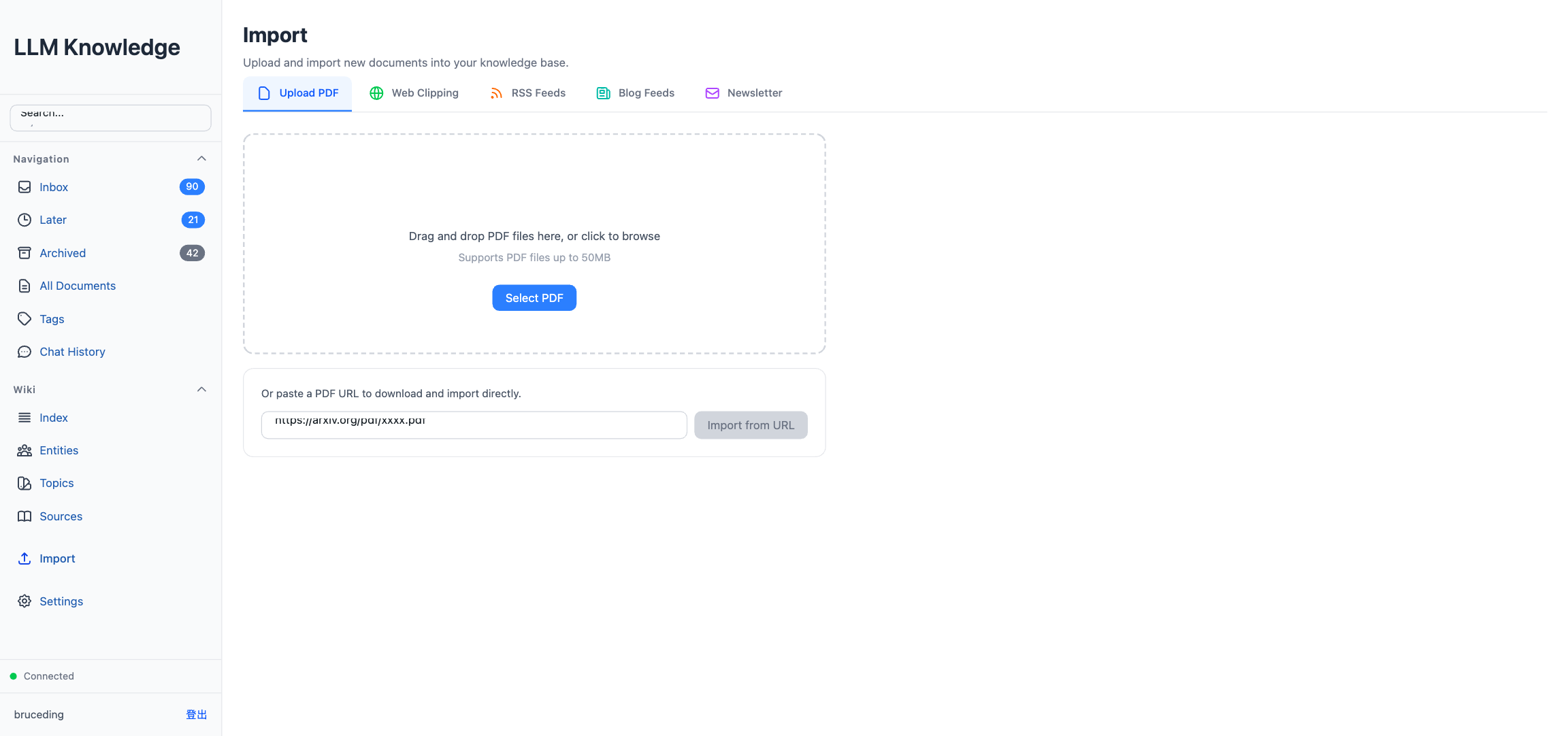
PDFs go to raw/papers/<slug>/paper.pdf plus paper.md. Web clips go to raw/web/<slug>.html plus .md. RSS, blog subscriptions, and newsletters each get their own subdirectory. The import page ties it all together with five tabs.
For PDFs that pdftotext can’t handle cleanly (scanned documents, complex layouts), there’s an optional LLM Extract: pdftoppm converts each page to PNG, and Claude sonnet recognizes each image back into Markdown, preserving headings, tables, formulas, and image placeholders. This runs entirely in a temporary directory with ALLOWED_DIR locked to it, so the model can’t wander anywhere else.
Publish triggers ingest
When the user clicks Publish, three things happen: the document status flips to published, a goroutine kicks off ingest.Pipeline.Ingest(), and when ingest completes, the wiki path is written back to the database.
Ingest is a single, large Claude CLI call. The prompt template tells Claude it’s a knowledge-base maintainer, not a translator. It reads the source document, checks which entities and topics already exist in the wiki, and either creates or updates pages in three categories:
- A
sources/<Name>.mdpage with metadata, abstract, key findings, methods, limitations, and related work. entities/<Name>.mdpages for people, companies, projects, and concepts — each with Overview, Core Mechanism, Evidence Sources, and Related (citing the source).topics/<Name>.mdpages for the themes discussed — each with Problem Statement, Prior State, New Contribution, Evidence Sources, and Related.- An append to
wiki/log.mdrecording what happened.
Claude isn’t a translator. It’s a librarian. That distinction is what lets the wiki grow organically — every new document adds to the graph instead of rewriting it.
After ingest, SyncIndexFiles() scans sources/, entities/, and topics/, parses each file’s frontmatter, sorts alphabetically, and regenerates the four index files. The entry page of the wiki is always up to date, with no manual maintenance.
The wiki view
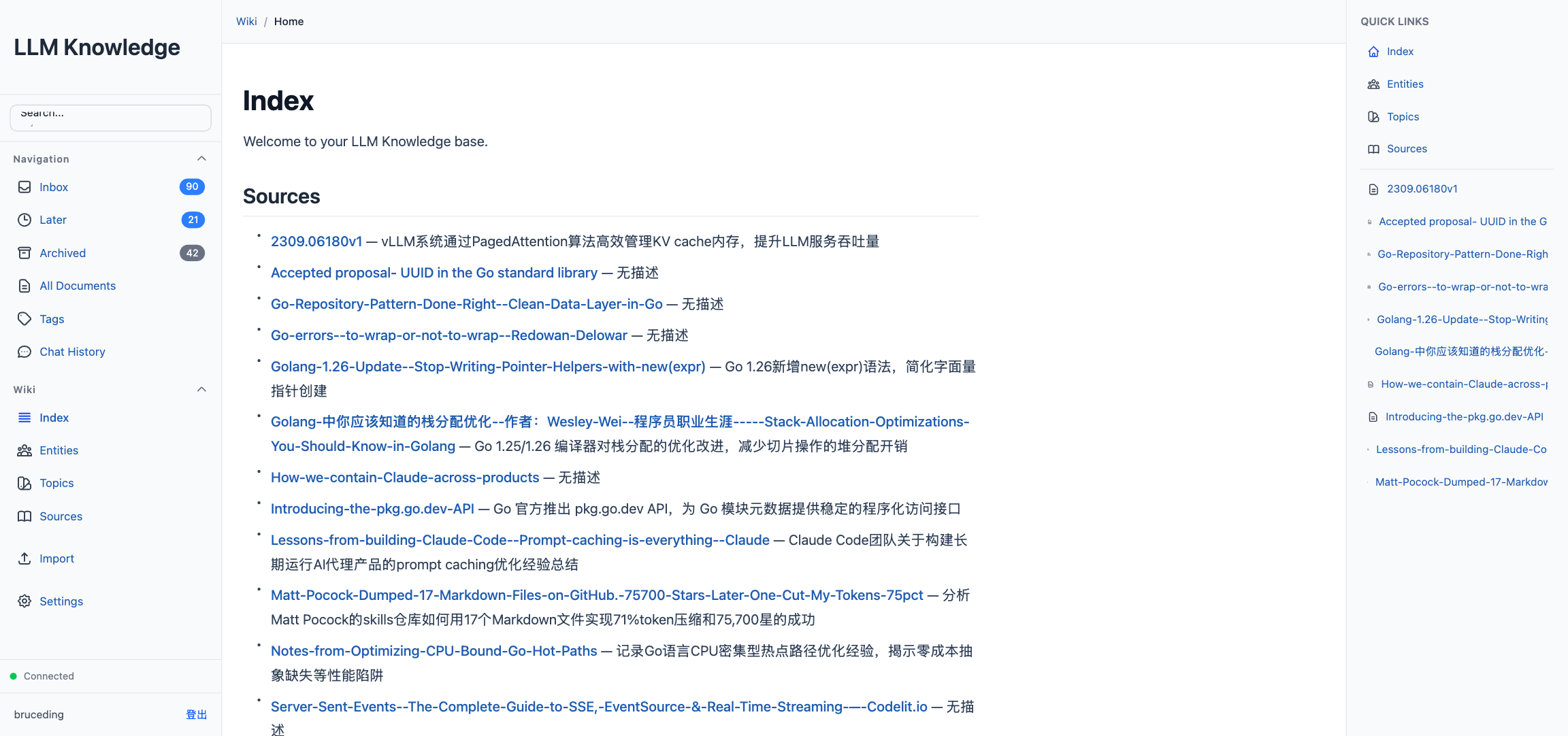
The frontend renders wiki files with ReactMarkdown, extended to support [[link]] syntax. Clicking an entity name jumps to its entities/<Name>.md page. Breadcrumbs at the top, quick links to sources/entities/topics in the sidebar. As the user reads more, the wiki naturally turns into a graph of cross-references.
The Chrome extension
Browsers are where most content starts, so there’s an MV3 Chrome extension (in extension/), compatible with Chrome, Edge, Brave, and any other Chromium-based browser. It asks for only storage, activeTab, and scripting permissions.
Click the toolbar icon and the service worker checks for a stored wiki URL and token, sets a gray … badge, injects content.js into the current tab, and asks it to extract the main content. content.js runs a selector cascade — #js_content first (that’s WeChat’s article body, handled specially because it’s the dominant platform in Chinese internet), then article, main, [role="main"], .post-content. It clones the matched node and strips script, style, iframe, nav, header, footer, .ads, .sidebar, .cookie-notice. The result goes back to the service worker, which POSTs it to /api/raw/web-clip. The badge turns green ✓ on success, red ✗ on failure, and clears itself after three seconds.
Authentication is a one-time thing on the settings page: enter the wiki URL and credentials, call /api/auth/login with clientType: 'extension' (which skips the captcha — not practical inside an extension), and store only the returned token. Passwords are discarded immediately. When the token expires, the backend returns 401, the extension clears it, and a toast nudges the user to log in again.
Keyboard shortcuts
For desktop browsers, a small set of vim-style shortcuts, automatically disabled when an input is focused so they never hijack typing:
j / k scroll the document down and up on the detail page (with acceleration on long press). g / G jump to the top and bottom. d deletes the hovered document in the Inbox or Wiki list (with a confirmation popup). Enter sends a message in chat, submits a search in the PDF reader, or adds a tag on the detail page. Shift+Enter inserts a newline. Escape closes any popup.
The rule: only high-frequency operations, and always matching vim or native browser conventions. Nothing to relearn.
A few more details worth mentioning
The SSE stream from Claude CLI is parsed on the backend and forwarded as data: frames; the frontend uses fetch + ReadableStream rather than EventSource because it needs a custom Authorization header. Events are fanned out to every subscriber channel non-blockingly, and critical events (result, error) log a warning rather than being dropped when a buffer fills up.
User data is partitioned by path (users/<id>/raw, users/<id>/wiki) and by user_id filter on every DB query; a migration tool moves legacy single-user data into the new layout automatically.
File-system access is protected at two layers: the static-file endpoints and the Claude path validator both do filepath.Abs + HasPrefix(absUserDir + sep) to prevent prefix collisions.
The headless-browser pool holds two Chromium workers, spawned on demand and recycled after use — used both for rendering SPA pages in blog subscriptions and for clipping JavaScript-heavy web pages.
PDF translation runs in an isolated Python 3.12 venv with qpdf and Chinese fonts; the startup script checks dependencies on every boot and disables the feature with a clear message if anything is missing.
Graceful shutdown is the textbook sequence: SIGINT or SIGTERM closes a done channel, waits 10 seconds for in-flight requests, kills every subprocess, and cleans up temporary security-settings files.
The UI is fully bilingual (Chinese and English), with a one-click toggle in settings. Mobile gets its own layout with a bottom-drawer chat panel.
Getting started
Three lines:
git clone https://github.com/bruceding/llm_knowledge.git
cd llm_knowledge
./start.sh
start.sh checks for pdftotext, Python 3.12, and qpdf, prompts for anything missing, then builds the frontend and backend and starts the service on port 9999. Data defaults to ~/.llm-knowledge/. Set PORT=8080 ./start.sh to change the port, or make dev for hot-reload development (backend on :3456, frontend on :5173).
First launch asks for a registration. After logging in, three things are worth doing immediately:
Set up an RSS or blog subscription under the Import tab, so the system starts pulling recent content. Install the Chrome extension and point it at your instance. Upload one PDF and watch what Claude extracts — the structured content, the summary, the wiki pages that appear when you publish. That mental model will carry you through everything else.
From there, the daily loop is: clip or subscribe when something is worth reading, open the detail page to chat with a document when you want to read it carefully, go to Wiki Chat when a question spans multiple sources. Over time, the wiki develops its own topic structure without any manual curation.
Family members can register on the same instance; each user’s data lives in its own partition and never intersects.
The code is at github.com/bruceding/llm_knowledge. Try it, open issues, or send PRs — all welcome.